Nバック計算アプリをリリースしました
Nバック計算で脳の訓練を行うアプリをリリースしました。
鬼〇レをプレイ中に「ゲーム機引っ張り出すの面倒だな…」と思ったので作ってみたんですが、音の出し方やストレスにならない程度の待ち時間等結構大変でした。
概ねNバック計算アプリとしては機能要件満たしてるのですが、やっぱりゲーム性がないと自分でやってても達成感が得られにくいですね。
そう考えると脳トレをゲームに落とし込んだ川島教授は凄い。
いまだインストール数0ですがいつか誰かにインストールしてもらえるようなアプリを作っていけたらいいなと思います
脳トレ!Nバック計算アプリ プライバシーポリシー(Privacy Policy)
Google Playに公開している脳トレ!Nバック計算アプリについてプライバシーポリシーを明記します。
【広告IDの利用】
広告を表示する際に、固有のIDが利用されています。
アプリから送信されるデータという点で、利用することをここに明記しています。
この情報から個人が特定されることはありません。
【ネットワークアクセス】
・アプリ内への広告表示に利用されています。
【ストレージの利用】
タイマーの項目を保存するために利用されています。
【Android Studio】Handlerを利用した定期実行
Timerを使わずにHandlerだけを使って定期実行する方法を調べたのでメモ
続きを読む【Android Studio】AlarmManagerとServiceを利用した定期的なアプリ起動
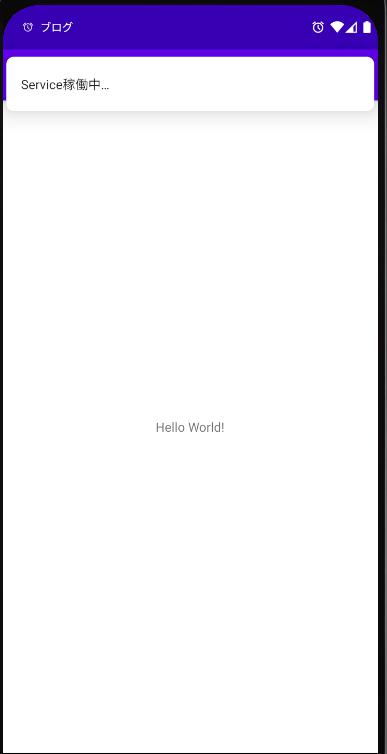
AlarmManagerとServiceを利用して定期的にアプリを起動し通知を出す方法を調べたのでメモ。 MinSDK: API 26 Android 8.0
まずはAndroidManifest.xmlへAlarmManagerとService機能有効の記述
<uses-permission android:name="android.permission.FOREGROUND_SERVICE" />
<uses-permission android:name="android.permission.SCHEDULE_EXACT_ALARM" />
続いてコード記述。 ・MainActivityでServiceを起動 ・Service(今回はServiceTest.java)内で通知処理とAlarmManagerを使って次回Service起動時間を指定する。 今回は10秒に1度通知を表示する。
まずはMainAcitivity、単純にServiceを起動しているだけ。
    @Override
    protected void onCreate(Bundle savedInstanceState) {
        super.onCreate(savedInstanceState);
        setContentView(R.layout.activity_main);
        Intent intentService = new Intent(getApplication(), ServiceTest.class);
        startForegroundService(intentService);
    }
続いてServiceTest.java。 startForegroundで通知を出した後にsetAlarmServiceで10秒後にServiceTestを起動するアラームを設定する
public class ServiceTest extends Service {
    private Context context;
    private MyBinder mBinder = new MyBinder();
    public class MyBinder extends Binder {
        //Serviceの取得
        ServiceTest getService() {
            return ServiceTest.this;
        }
    }
    @Override
    public void onCreate() {
        context = getApplicationContext();
    }
    @Override
    public IBinder onBind(Intent intent) {
        // TODO: Return the communication channel to the service.
        // サービスとの接続確立時に呼び出される
        return mBinder;
    }
    @Override
    public int onStartCommand(Intent intent, int flags, int startId) {
        String channelId = "default";
        String title = getString(R.string.app_name);
        String message = "Service稼働中…";
        // channel作成
        NotificationChannel channel = new NotificationChannel(
                channelId, title , NotificationManager.IMPORTANCE_HIGH);
        // 通知をタップした時に呼び出すIntentの定義
        Intent tap_intent  = new Intent(ServiceTest.this, MainActivity.class);;
        tap_intent.setFlags(
                Intent.FLAG_ACTIVITY_SINGLE_TOP
        );
        PendingIntent pendingIntent =
                PendingIntent.getActivity(context,
                        0, tap_intent, PendingIntent.FLAG_IMMUTABLE);
        NotificationManager notificationManager =
                (NotificationManager)context
                        .getSystemService(Context.NOTIFICATION_SERVICE);
        Notification notification = new Notification.Builder(context, channelId)
                .setSmallIcon(android.R.drawable.ic_lock_idle_alarm)
                .setContentText(message)
                .setAutoCancel(true)
                .setContentIntent(pendingIntent)
                .setWhen(System.currentTimeMillis())
                .build();
        // API26以上の場合はチャンネル作るの必須
        notificationManager.createNotificationChannel(channel);
        startForeground(1, notification);
        // 次のService起動のためアラームを設定する
        setAlarmService(context, 10);
        // 定数を返す。
        return START_NOT_STICKY;
    }
    /
      Serviceを起動するためのアラームを設定する
     * @param context
     * @param timer
     /
    private void setAlarmService(Context context, long timer)
    {
        // アラーム設定(今回は10秒固定)
        Calendar cal = Calendar.getInstance();
        cal.setTimeInMillis(System.currentTimeMillis());
        cal.add(Calendar.SECOND, (int) timer);
        long startMillis = System.currentTimeMillis() + (timer * 1000);
        // ServiceのIntentを取得して設定
        PendingIntent pendingIntent = getPendingServiceIntent(context);
        AlarmManager alarmManager
                = (AlarmManager) context.getSystemService(Context.ALARM_SERVICE);
        AlarmManager.AlarmClockInfo clockInfo = new AlarmManager.AlarmClockInfo(startMillis, null);
        if(alarmManager != null){
            // 10秒後にServiceTestを起動するアラームの設定
            alarmManager.setAlarmClock(clockInfo, pendingIntent);
        }
    }
    /
      ServiceTestのPendingIntent取得
     * @param context
     * @return
     /
    private PendingIntent getPendingServiceIntent(Context context){
        Intent intent = new Intent(context, ServiceTest.class);
        intent.setFlags(
                Intent.FLAG_ACTIVITY_CLEAR_TOP
        );
        PendingIntent pendingIntent = PendingIntent.getService(context, 0, intent, 0);
        return pendingIntent;
    }
}
以上の記述によりAlarmManagerを利用したServiceの定期起動が可能になりました。